Orbital System
Six orbs circle the sun. Each has its own distance, speed and role; each is a modulation source that breathes with the orbit.
ICARENGINE presents
The Gravity Synthesizer
Six orbs. One sun.
A sampler that locks to your DAW.
Every sound falls into the well.
£99 Launch offer — 40% off with LAUNCH40
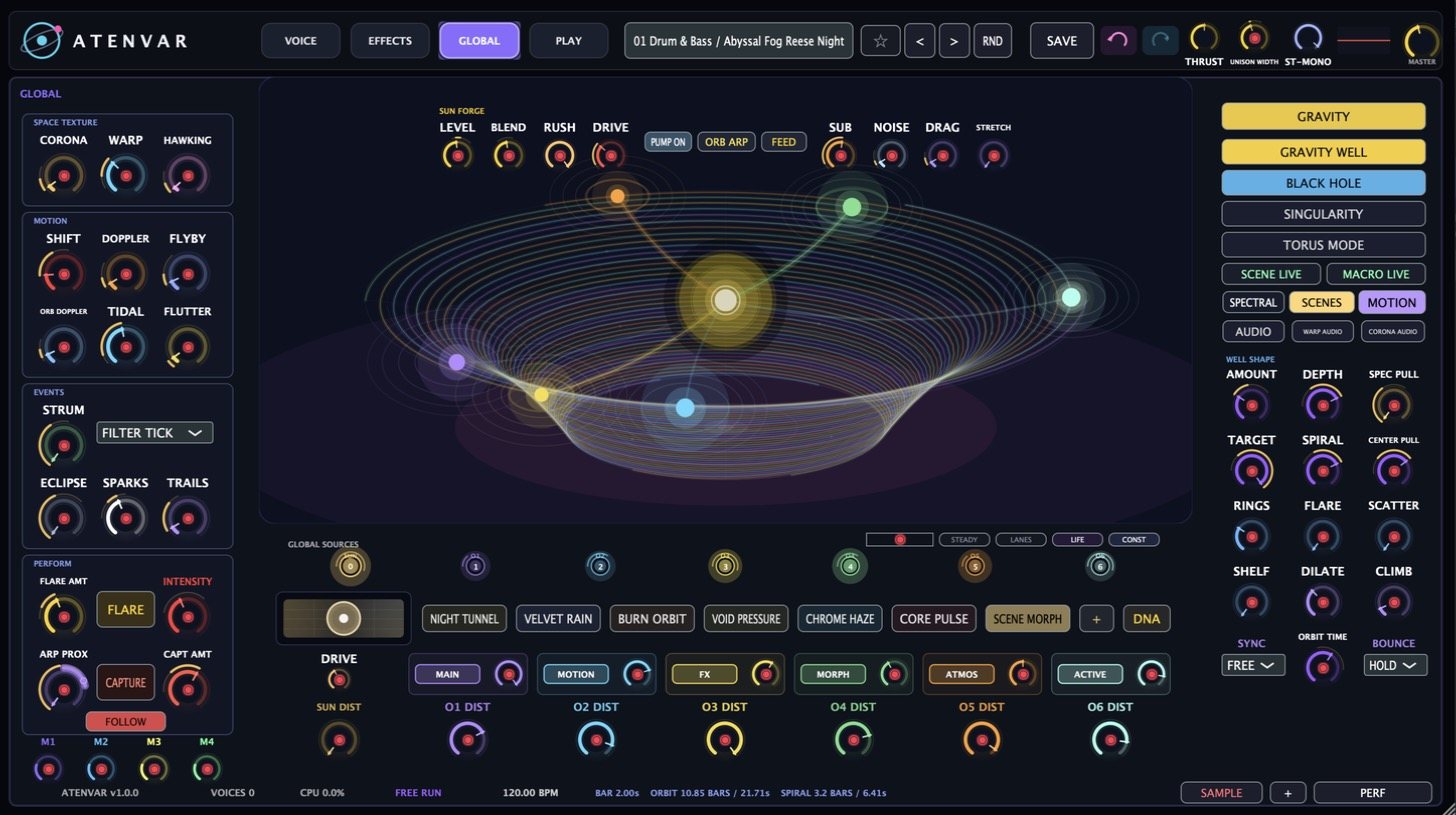
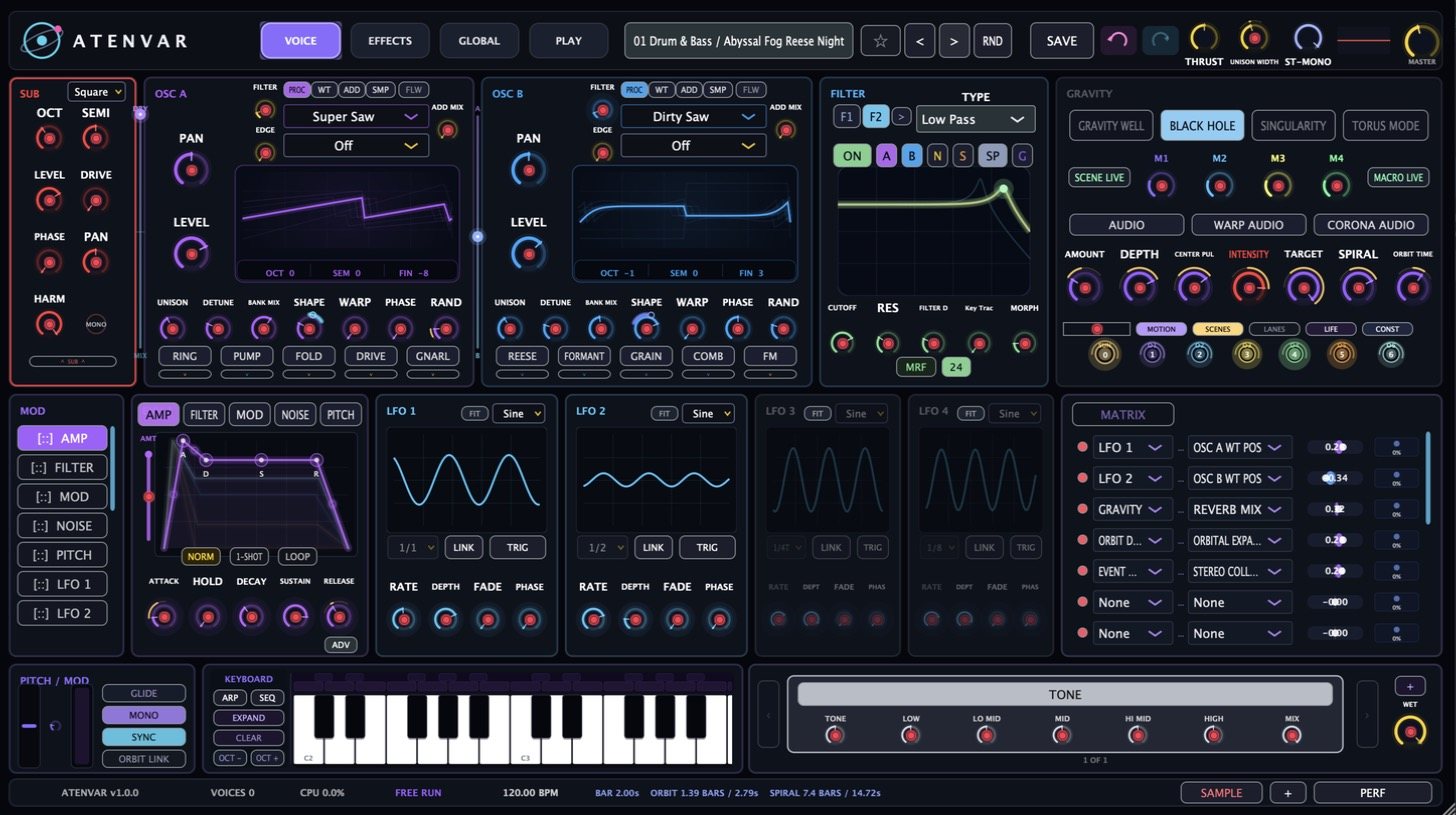
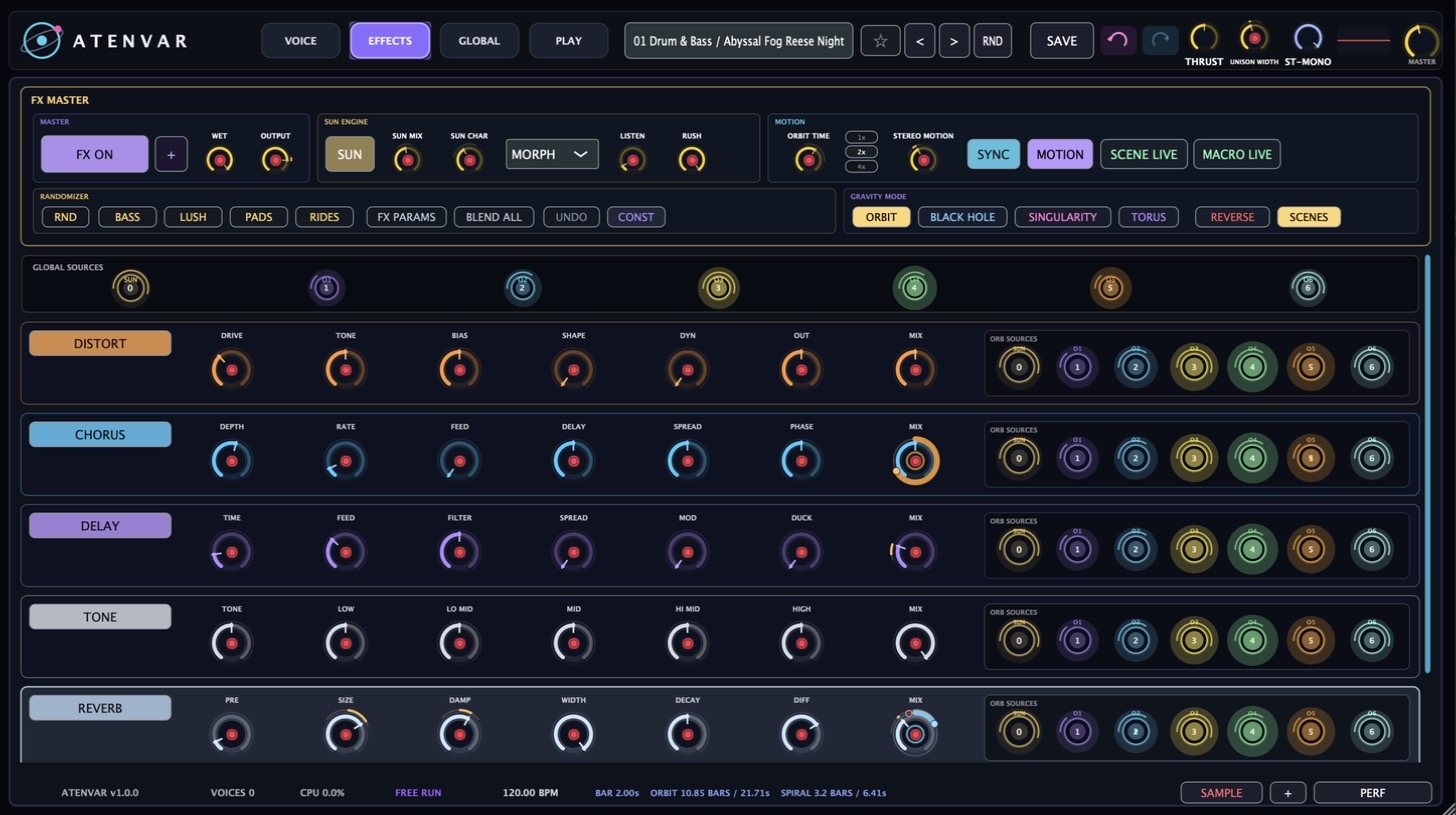
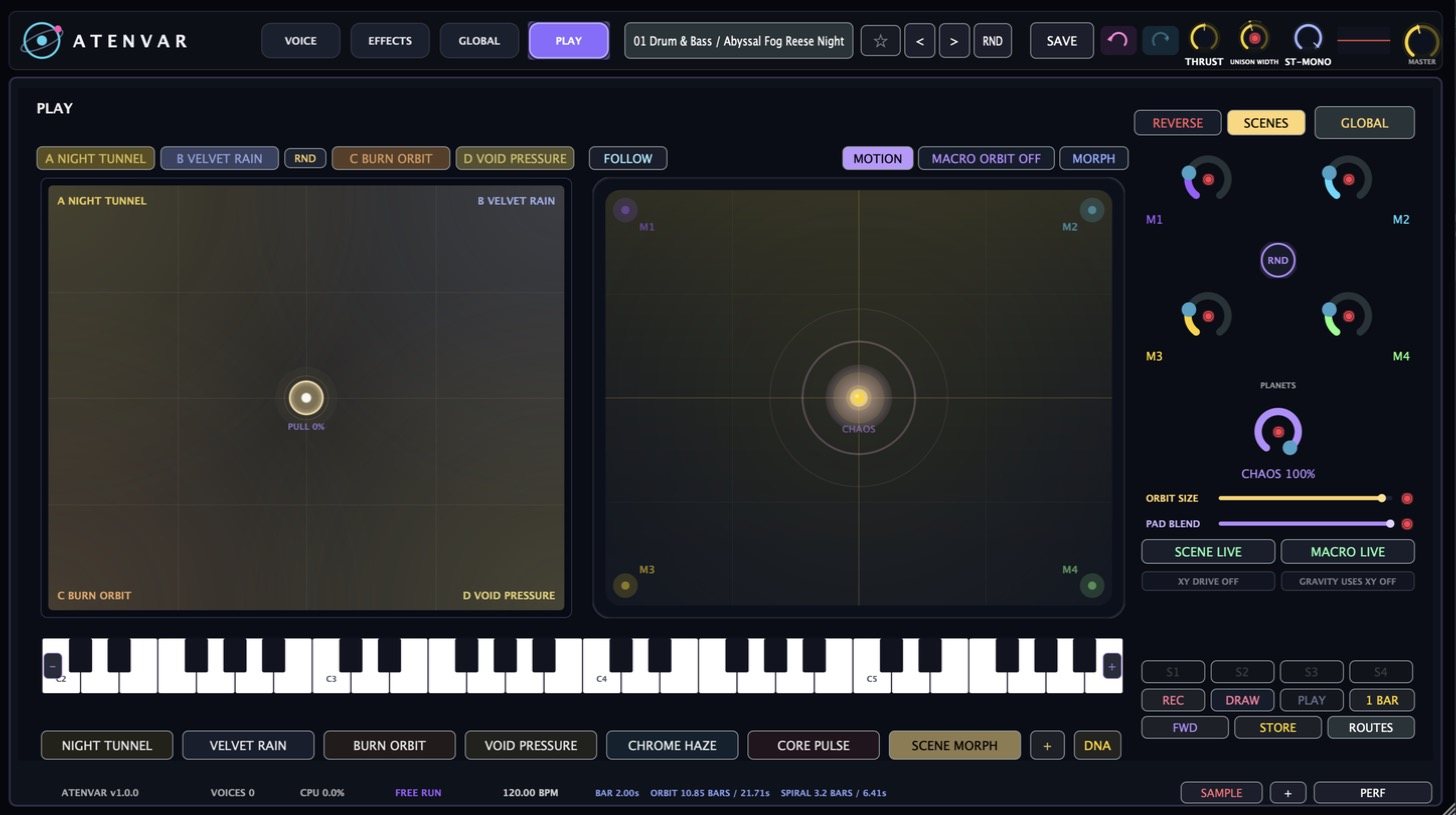
Real interface capture — build 1.0 · Apple Silicon
System Overview
ATENVAR is built around a physical idea: a sun, six orbs circling it, and a gravity well the sound falls into. Anything routed to an orb comes closer and goes further with it. Everything below hangs off that system.
Six orbs circle the sun. Each has its own distance, speed and role; each is a modulation source that breathes with the orbit.
Gravity Well, Black Hole, Singularity and Torus. Amount, depth, intensity, target and spiral shape the pull — and the sound follows the picture.
OSC A and OSC B each run procedural waveforms, wavetables, additive or a sample — with unison, warp, shape and per-osc effects like Fold, Reese, Formant and FM.
Drop a loop in and it locks to your DAW tempo. Play it on any key — pitch changes, tempo doesn't. CLEAN or GRAIN playback, slices, and one-click FIT.
GRAIN, VOCODE and S1000. Phase-aligned granular, a clean phase vocoder, or the deliberately buzzy classic-sampler stretch.
F1 and F2 with per-source routing — feed them OSC A, OSC B, noise, sub or the sampler independently. Morph, key-track, drive and a Resonator type.
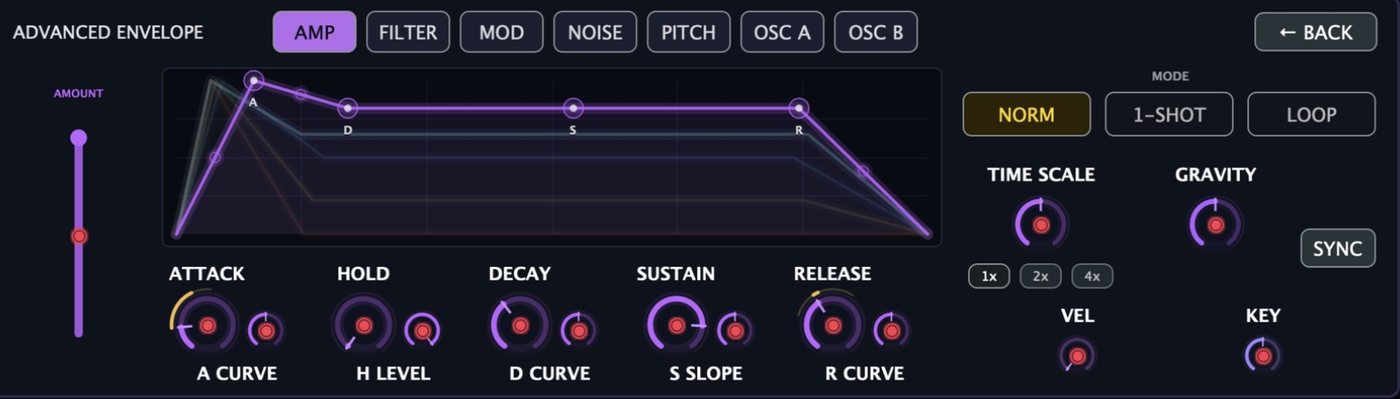
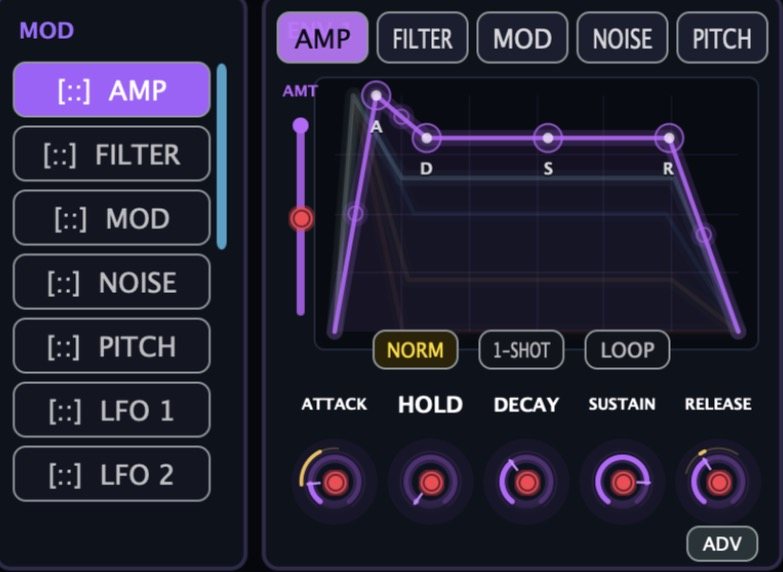
AMP, FILTER, MOD, NOISE and PITCH envelopes with curves, hold, loop and time-scale; per-osc envelopes in the advanced view; four LFOs with FIT and sync.
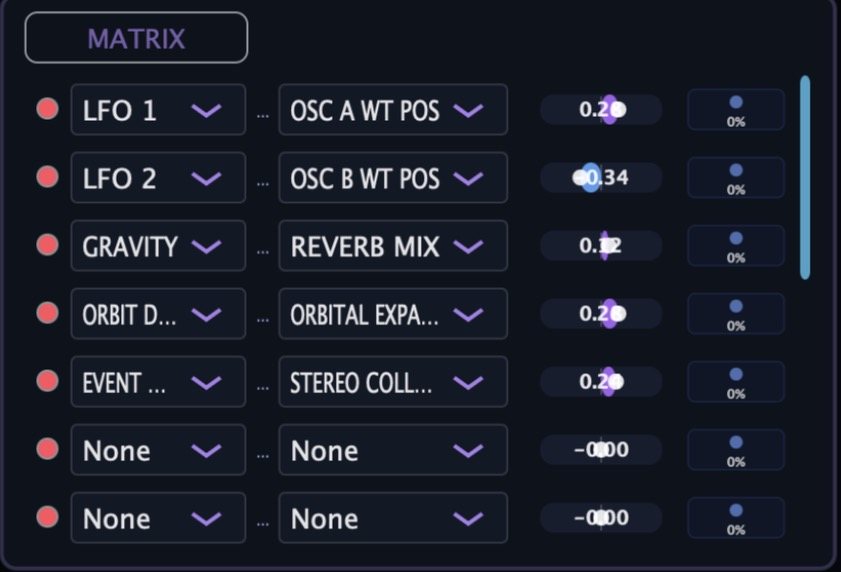
Orbits, gravity, LFOs, envelopes, events and the mod wheel to any destination — including wavetable position, reverb mix and orbital expansion.
Sixteen steps, four patterns with chain, scale lock, slide and dive steps, mutate and gravity. An arpeggiator with an ACID TB accent section and style save.
Distort, Chorus, Delay, Reverb, Atmos, Wavefold, Comb, Pump, Granular, Spectral, Resonate and more — every module with its own orb sources.
The sun is a sound source too. Sun Forge shapes it; SUN DIST is a heat macro — warm lift, analogue grit, bright drive, then solar flare.
Morph between four scenes on an XY pad, throw the four macros into orbit with chaos, record gestures to snapshots and play it all live.
The Four Pages
Everything lives on four pages across the top of the window. No hidden menus — the whole instrument is on screen.
Page 01
Sub, noise, two oscillators, twin filters, the gravity panel, five envelopes, four LFOs and the matrix, all on one screen. The keyboard strip along the bottom opens the arpeggiator or the step sequencer in place of the envelope block.
Page 02
An FX MASTER strip on top — wet, output, the SUN engine with its own mix and character, motion controls, a randomizer and the gravity mode — then a vertical rack of modules pulled from a 21-strong catalog. Each module carries its own ORB SOURCES row, so the orbs can play the effects.
Page 03
The visualiser fills the middle of the page: the sun, six orbs on their spiral arms, and the well they fall into. Around it sit space texture, motion, events and perform controls on the left; the gravity modes and WELL SHAPE knobs on the right; and the orb strip along the bottom with a lane, a DIST knob and a scene slot for every orb.
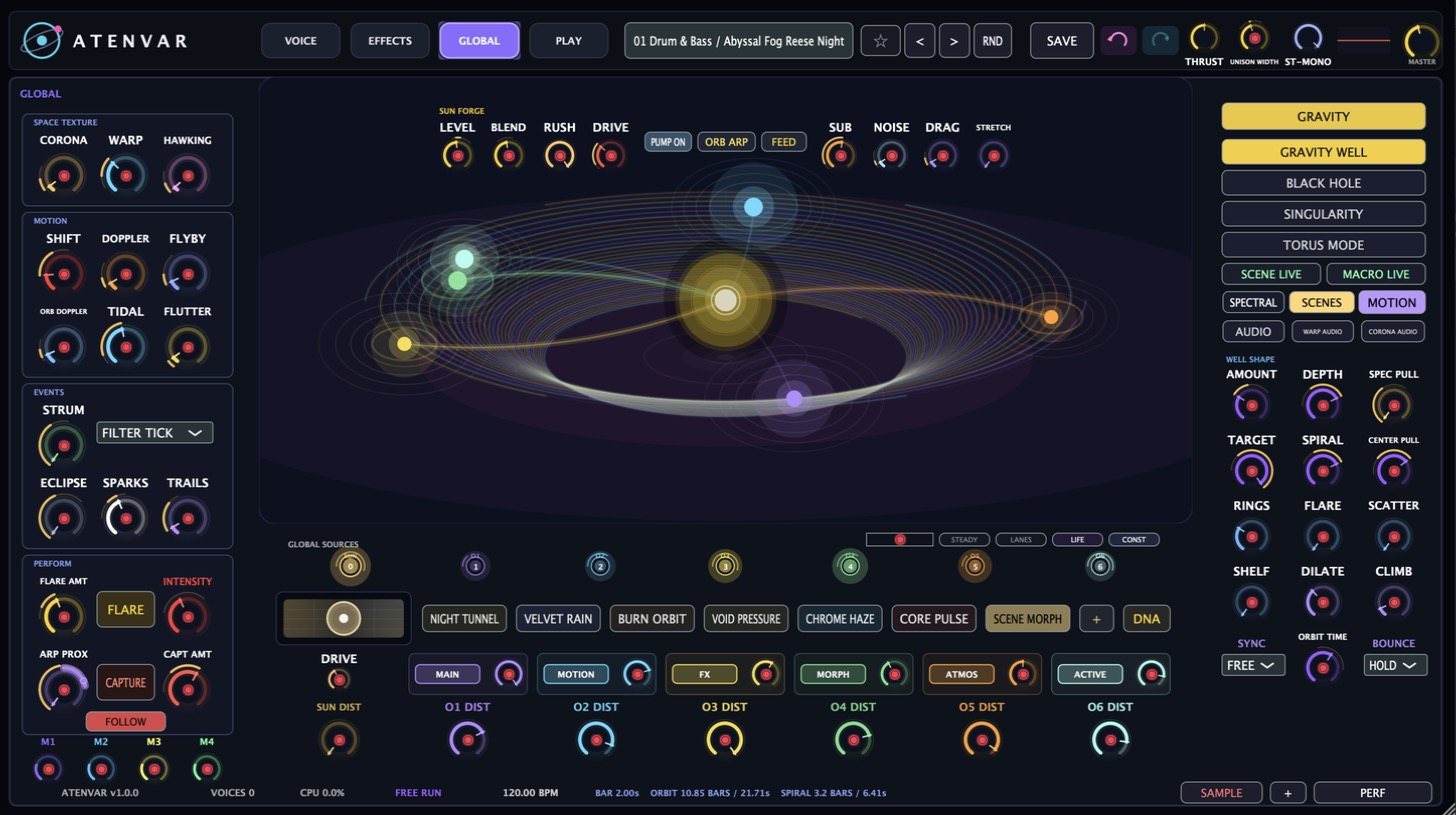
Page 04
Two big pads. The left one morphs between four scenes — drag the sun toward NIGHT TUNNEL or VOID PRESSURE and the patch follows. The right one puts the four macros into orbit around a chaos control. Snapshots S1–S4, REC, DRAW, one-bar loops and ROUTES sit beside them with a full-width keyboard underneath.
Gravity
The visualiser isn't decoration. Orbs ride their spiral arms exactly as deep as their DIST knobs say, the well tightens as gravity rises, and what you hear is what you see.
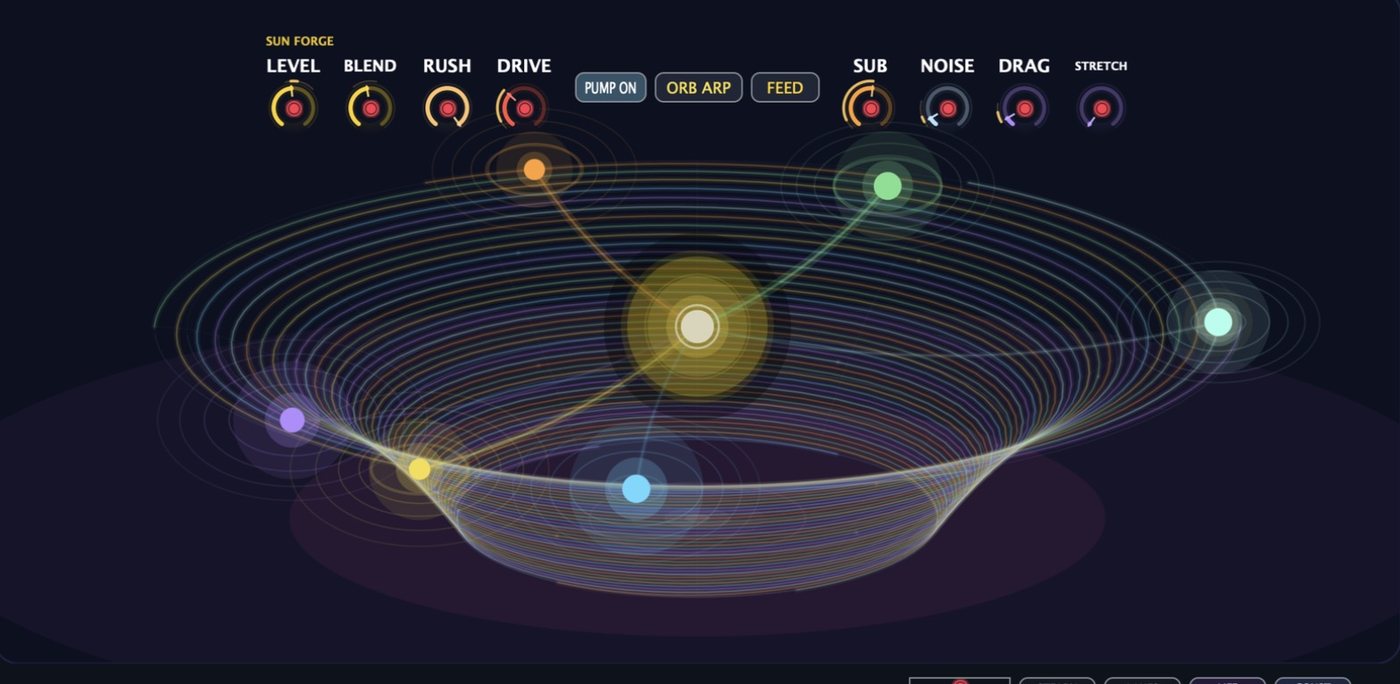
The default. Orbs circle on flat rings and their tethers to the sun swell as they come close. Wide, musical movement.
The rings become a funnel. Orbs spiral inward, the sound compresses and darkens as they fall, and events fire on the way down.
Everything collapses toward one point. Tight, intense, nearly monophonic motion for risers, drops and stabs.
Orbs loop through a ring rather than around a centre — cyclic, breathing modulation that never quite settles.
Gravity panel
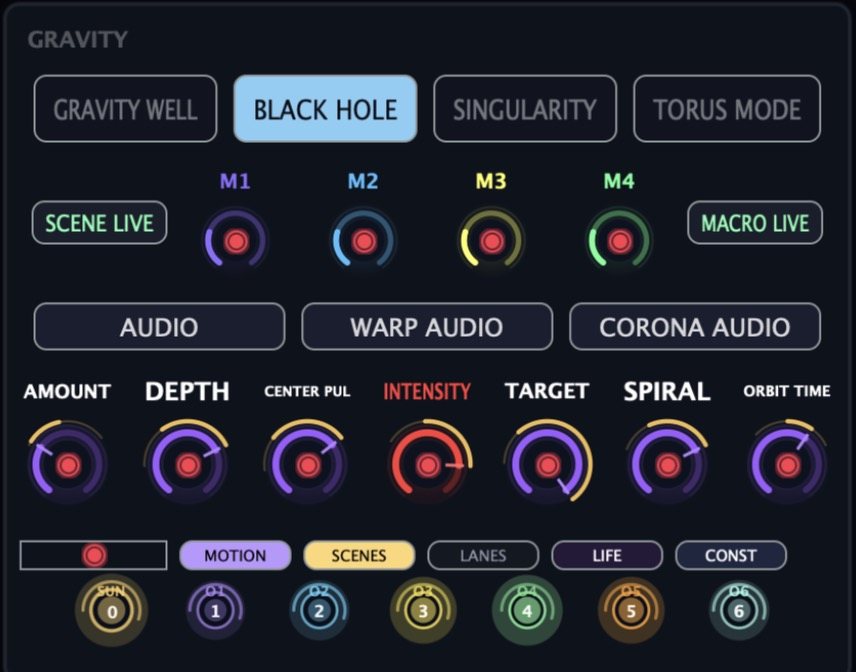
AMOUNT, DEPTH, CENTER PULL, INTENSITY, TARGET, SPIRAL and ORBIT TIME live on the VOICE page beside the four macros. Underneath, the seven-cell strip — SUN then O1 to O6 — shows every orb's colour and number; the same strip repeats on the EFFECTS and GLOBAL pages, so an orb is always in the same column.
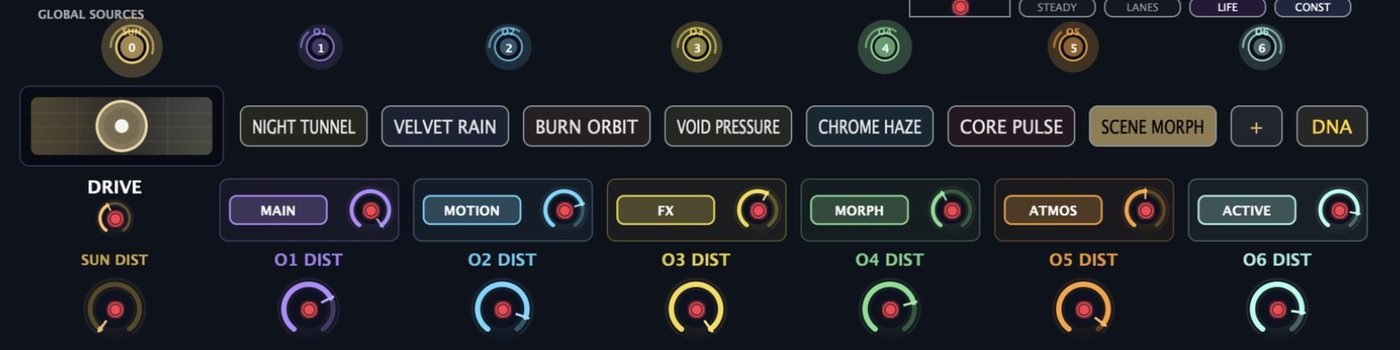
Sun Dist New
SUN DIST is one knob that moves the whole patch toward the sun. Low values are a warm lift; the middle zone brings analogue grit as the filter opens and drives; near the top a presence shelf and stereo width kick in; at the very top a solar flare — a slow random drift with a soft squeeze on the master bus. At zero it is fully bypassed.
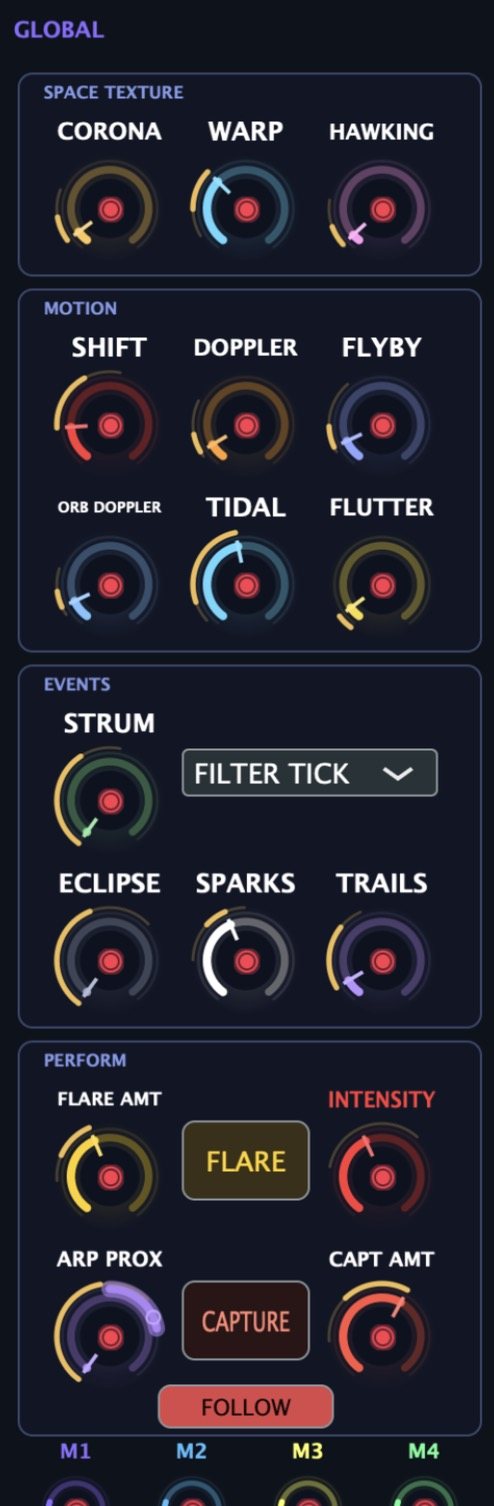 Space texture · Motion · Events · Perform
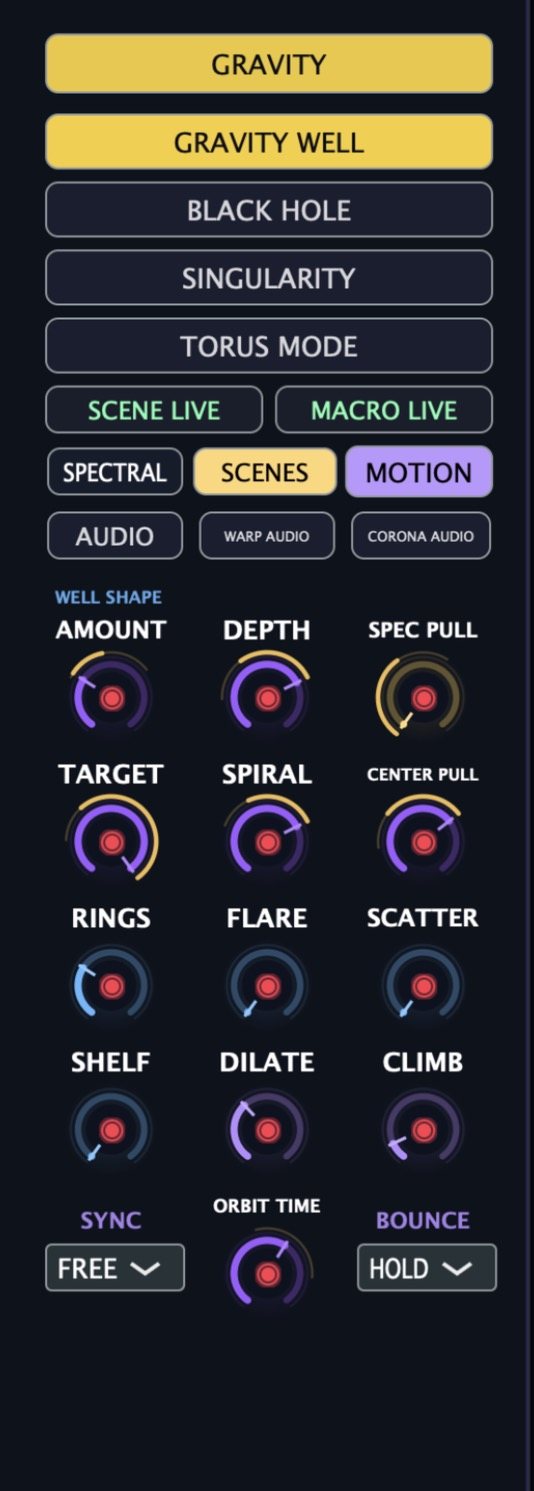 Gravity modes · Well shape
Left: CORONA, WARP and HAWKING texture; SHIFT, DOPPLER, FLYBY, ORB DOPPLER, TIDAL and FLUTTER motion; STRUM, ECLIPSE, SPARKS and TRAILS events; FLARE, CAPTURE and FOLLOW for performing.
Right: the four gravity modes, SCENE LIVE and MACRO LIVE, SPECTRAL / SCENES / MOTION views, and twelve WELL SHAPE knobs from AMOUNT and DEPTH down to SHELF, DILATE and CLIMB, with SYNC, ORBIT TIME and BOUNCE.
Sampler New
Drag an audio file onto the sample editor — or press LOAD — and ATENVAR locks it to your DAW tempo, follows tempo changes, and keeps it in time whatever key you play.
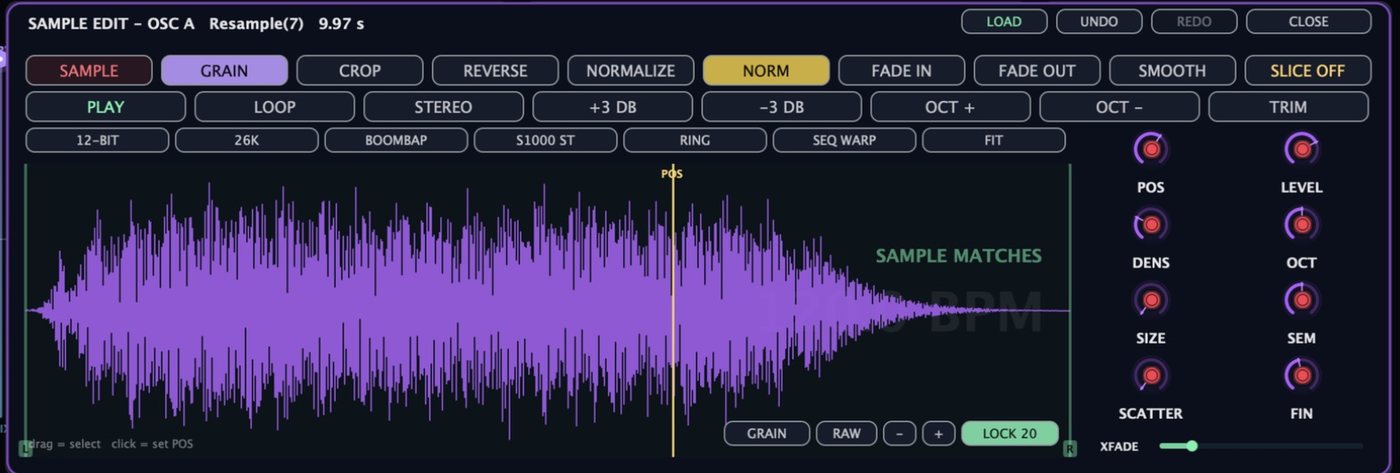
Auto-detects bars and beats on load, shows the DAW tempo large behind the waveform and says SAMPLE MATCHES when it lands. Right-click LOCK to set 1–32 bars or 1–6 beats by hand if a 174 BPM break lands in a 120 BPM song.
On a locked sample, playing up an octave doubles the pitch and leaves the groove exactly where it was. Unlock it and you get the classic vari-speed behaviour back.
GRAIN — phase-aligned granular, transposition doesn't shift the carrier. VOCODE — a 1024-point phase vocoder, clean on pitched material. S1000 — 12 ms cycles and a 25% crossfade: the buzz and flutter of the old classics, on purpose.
A loaded sample starts in CLEAN — a plain head that plays the file straight. Flip the mint-and-violet button beside SAMPLE to GRAIN for a cloud with POS, DENS, SIZE and SCATTER.
Time-stretch a locked loop and it auto-fits back to its bars in the same edit — one undo. FIT does the same on demand. Every edit is stored as a recipe with the preset, so a patch replays identically.
CROP, REVERSE, NORMALIZE, fades, SMOOTH and SLICE with numbered slices at every zoom; 12-BIT, 26K, BOOMBAP, S1000 ST, RING and SEQ WARP for the old-school character in one press.
Sound Sources
OSC A · OSC B
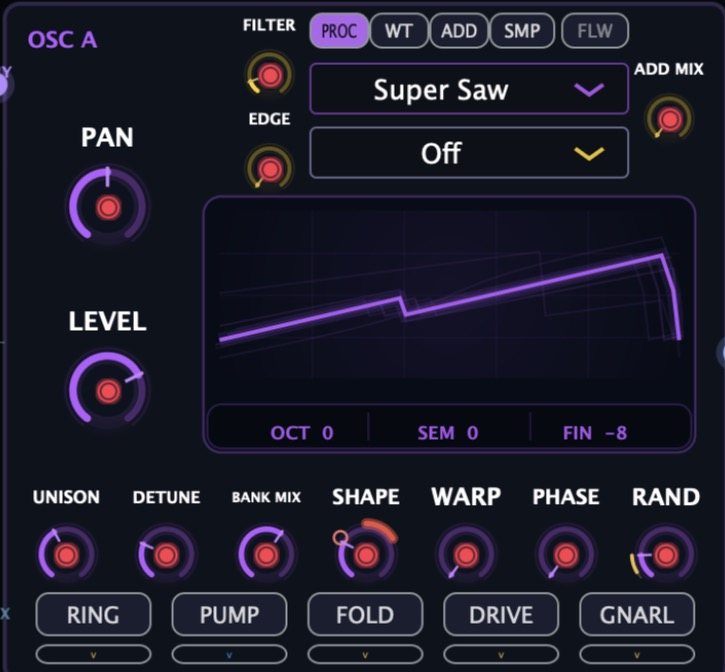
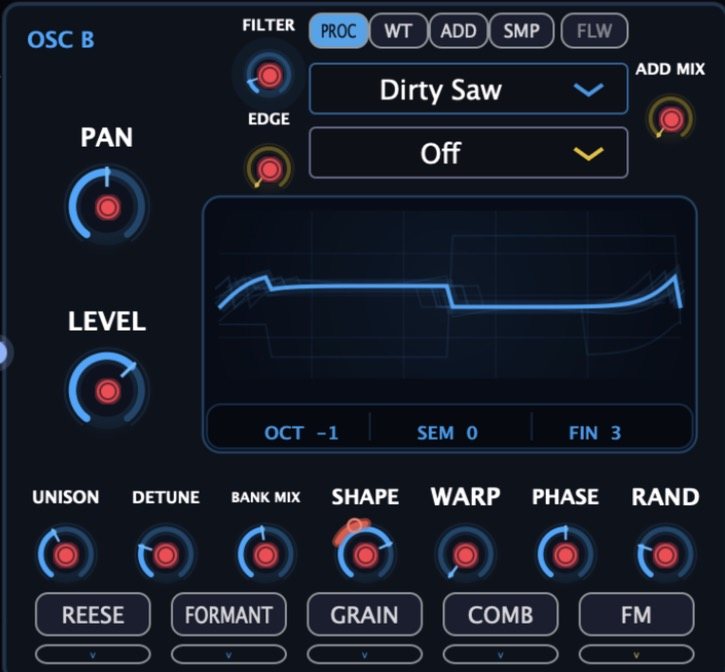
PROC gives you procedural waves — Saw, Super Saw, Dirty Saw and the rest — with an EDGE control. WT is wavetable with a BANK MIX. ADD is additive with its own ADD MIX. SMP loads the sampler into the oscillator slot. Under every engine: UNISON, DETUNE, SHAPE, WARP, PHASE and RAND, with the live waveform drawn above.
SUB · NOISE · FILTER
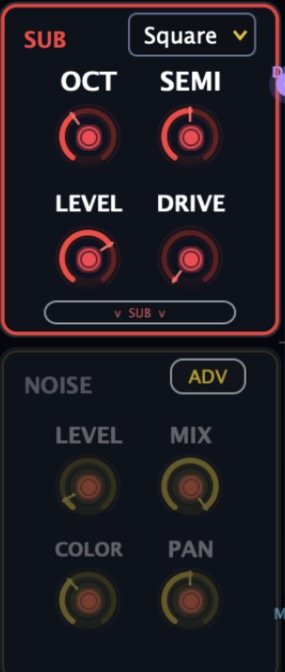
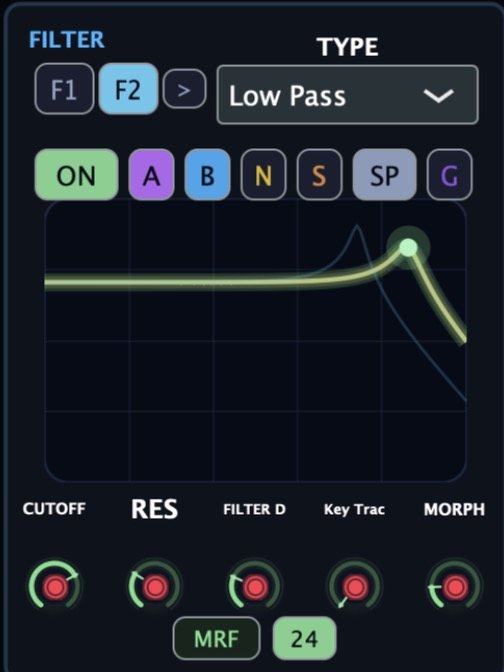
The sub has its own waveform, OCT and SEMI, LEVEL, DRIVE, PHASE, PAN and HARM — and a MONO switch for club-tight low end. Noise brings LEVEL, MIX, COLOR and PAN with an advanced view. Both feed F1 and F2, which each take any mix of A, B, N, S, SP and G sources.
Modulation
Envelopes
AMP, FILTER, MOD, NOISE and PITCH on the front panel, OSC A and OSC B in the advanced view. Each is AHDSR with a curve knob per stage, NORM / 1-SHOT / LOOP modes, a TIME SCALE with 1×, 2× and 4× buttons, a GRAVITY amount, VEL and KEY tracking, and SYNC to tempo. Drag the points on the display or turn the knobs — the readouts show the real times.
LFOs · Matrix
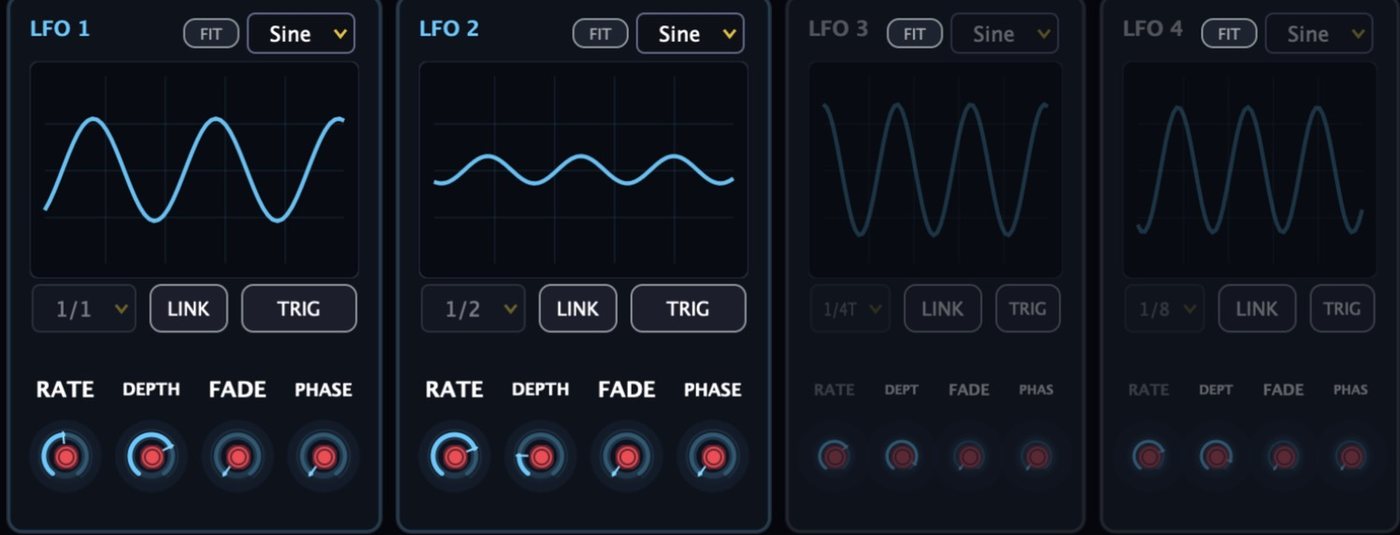
Each LFO has a shape menu, a FIT button that snaps its cycle to the note, RATE, DEPTH, FADE and PHASE, tempo divisions from 1/1 to 1/8 and triplets, LINK and TRIG. The matrix lists source → destination rows with a bipolar depth slider and a live meter — LFO 1 to OSC A WT POS, GRAVITY to REVERB MIX, EVENT to STEREO COLLAPSE, ORBIT DIST to ORBITAL EXPANSION.
Sequencing
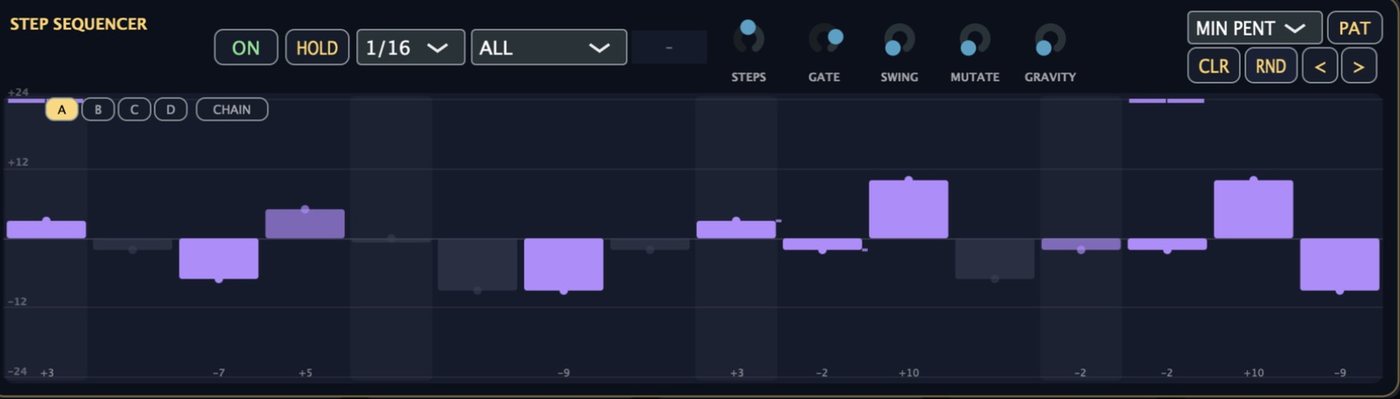
Step sequencer
Draw pitch per step, lock to a scale, set the rate and gate, then mutate. Patterns A–D chain into longer phrases; SLIDE steps glide, DIVE steps drop. The whole thing is tempo-synced to your DAW and stores with the preset. Per-step lanes let you sequence more than pitch.
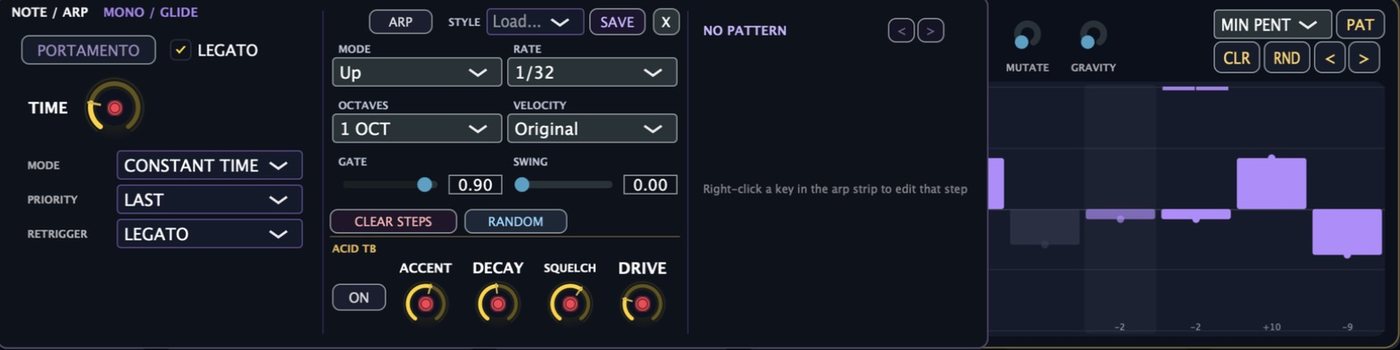
Arpeggiator · Glide
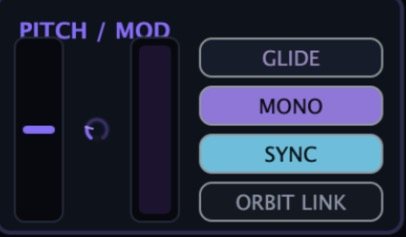
Up, down and pattern modes, 1/32 to bar rates, octave range, velocity source, gate and swing — plus an ACID TB block with ACCENT, DECAY, SQUELCH and DRIVE for 303-style lines. Save styles and recall them. Next to it, the portamento panel: constant time or rate, note priority, retrigger mode and LEGATO.

Effects
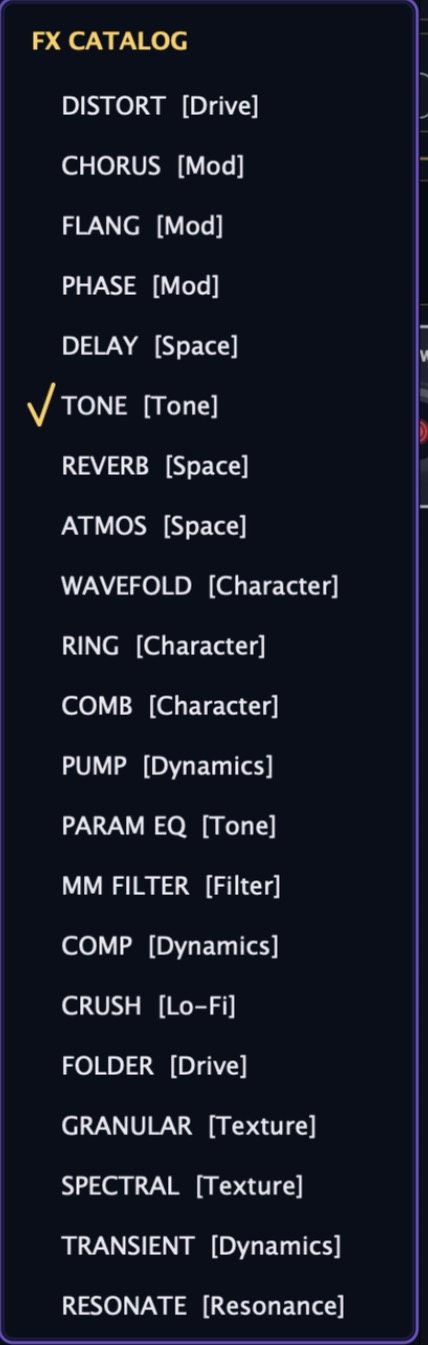
Press + and pick from the catalog. Each module drops into the rack with seven knobs and its own ORB SOURCES row, so orb 3 can duck the delay while orb 5 opens the reverb.
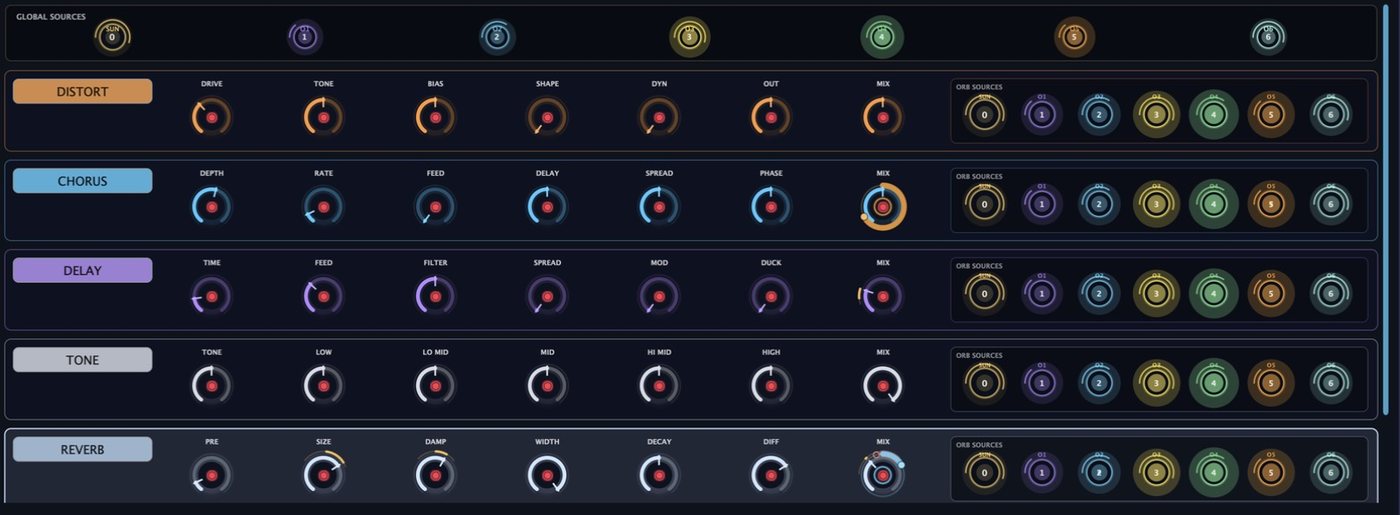
Drive · Mod · Space · Tone · Character · Dynamics · Filter · Lo-Fi · Texture · Resonance

FX MASTER: FX ON, WET and OUTPUT · SUN engine with SUN MIX, SUN CHAR, MORPH, LISTEN and RUSH · ORBIT TIME and STEREO MOTION · randomizer · gravity mode. PUMP lights when it ducks.
Interactive
A visual sketch of the idea at the core of ATENVAR — six orbs, one sun, a well. Drag the controls and watch the field respond. In the instrument, every orb is a modulation source.
Visual demonstration only — no audio
In the full instrument, every orb drives any parameter in the modulation matrix and every FX module.
In Action
Listen
Raw output from ATENVAR — no external processing. One demo plays at a time.
Presets
A browser with categories, tag filters, favourites, recent and instant search. Every factory sound was voiced on the orbital system — they move.
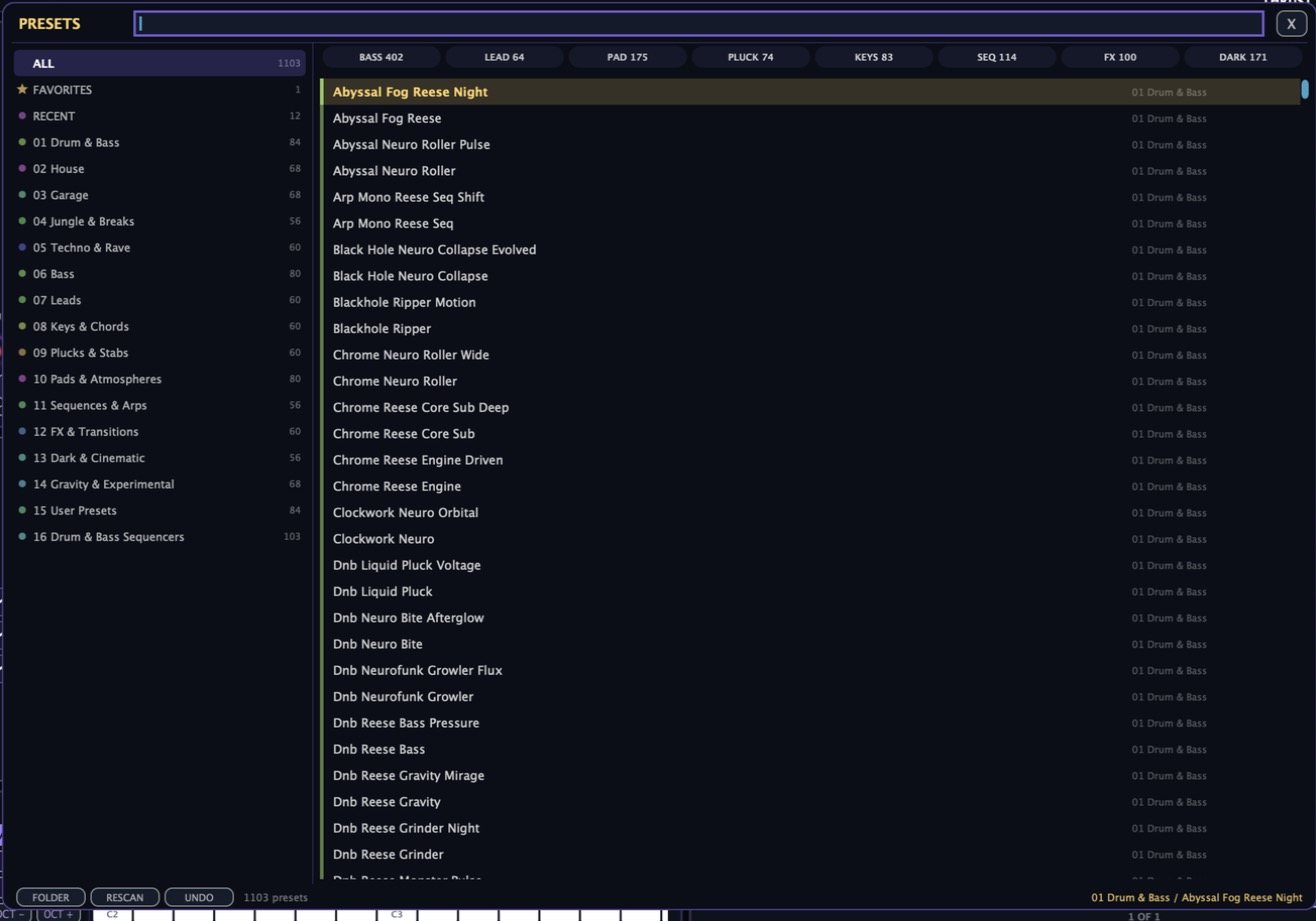
Factory library
Latest build
Loops lock to the host tempo, follow tempo changes, and stay in time on every key. Right-click LOCK to set bars or beats by hand.
Three warp engines for locked samples: phase-aligned granular, a phase vocoder, and the classic fixed-cycle stretch.
A stretch on a locked sample fits back to its bars inside the same edit — one undo. FIT does it on demand.
Drop audio straight onto the sample editor; a LOAD button sits beside UNDO. Loaded samples start in CLEAN.
Warm lift, analogue grit, bright drive, solar flare — one knob on the sun, bypassed at zero.
Sources, lanes and DIST knobs share one grid: SUN then O1–O6, with each orb's controls in its own column.
PUMP pulses with its duck, ORB ARP and FEED light when active, and the FX-rack PUMP shows its depth.
Quality tiers latch per note, limiters glide, the CPU governor no longer oscillates, and the FX gate crossfades — no clicks under load.
The host BPM sits large behind the sample; slice numbers stay readable at every zoom; the mod wheel does vibrato until you route it.
Interface
Real captures from the current build. Click any frame to open it full-size; arrow keys navigate.
Questions
ATENVAR is £99. During the launch period, code LAUNCH40 takes 40% off at checkout.
Click Buy Now, then enter LAUNCH40 in the discount field on the Lemon Squeezy checkout page before paying.
VST3, Audio Unit (AU) and a standalone app on macOS. A Windows VST3 build is in testing. Pro Tools (AAX) is not supported.
A Mac with an Apple Silicon chip (M1 or later) running macOS 12 or newer. Intel Macs are not supported. ATENVAR has ECO, BAL and LUX quality tiers plus a PERF panel, so it runs comfortably on a base M1.
1,103 factory presets across sixteen banks — from Drum & Bass, House and Garage to Pads, Dark & Cinematic and Gravity & Experimental — plus over a hundred sequencer patches. Your own sounds save to ~/Documents/ATENVAR Presets/User.
Yes — drop any WAV or AIFF onto the sample editor. It locks to your DAW tempo, follows tempo changes, and plays in time on every key. Choose GRAIN, VOCODE or S1000 for the stretch character.
Checkout and delivery are handled by Lemon Squeezy. After purchase you receive a download link and a serial by email; paste the serial when ATENVAR first opens.
To be confirmed before release.
To be confirmed before release.
See the refund policy for full details, or contact admin@icarengine.com.
Email admin@icarengine.com — or start with the documentation, which covers installation, activation and troubleshooting.
Get ATENVAR
Secure checkout via Lemon Squeezy · VST3 · AU · Standalone · macOS Apple Silicon
Payments, downloads and serials are handled by our merchant of record, Lemon Squeezy. Questions? admin@icarengine.com